
Instagram Follow Pro
A powerful Chrome extension to organize and manage your Instagram follow workflow with a simple queue, dashboard and persistent activity logs.
See Instagram Follow Pro in Action
Watch the quick demo to see how the extension works.
Powerful Features
Everything you need to organize your Instagram follow workflow from one simple Chrome extension.
Follow Queue
Add Instagram handles to a queue and process them in an organized workflow.
Followers & Following
Work with followers or following lists and select the maximum number of accounts to process.
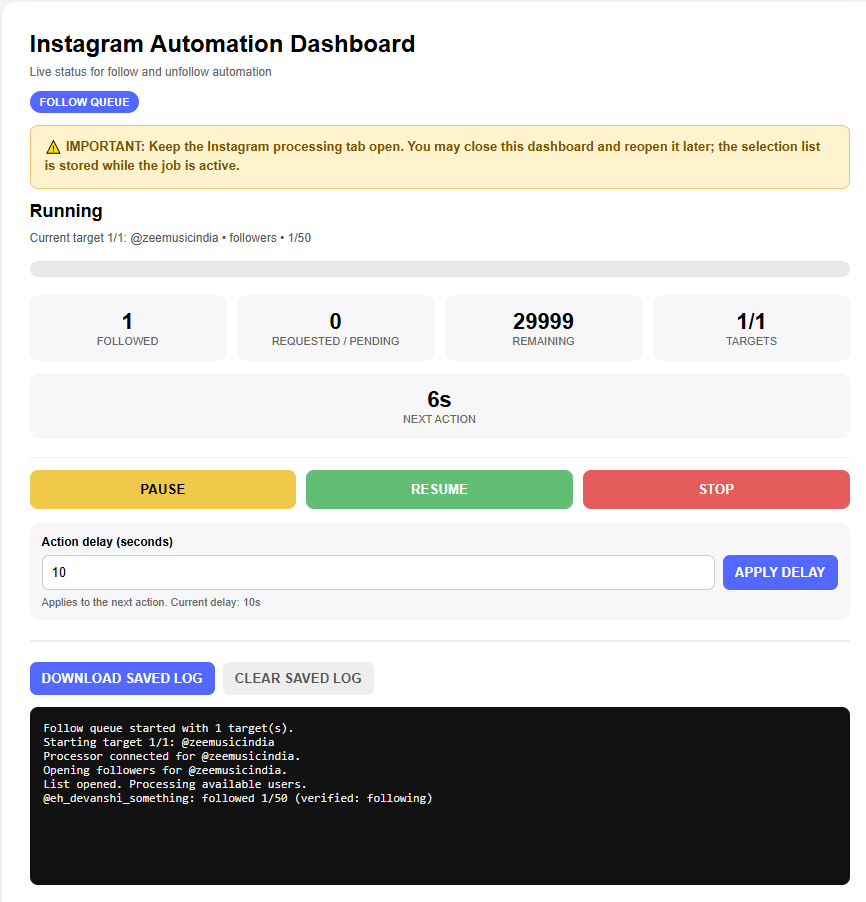
Activity Dashboard
Keep track of your activity with a clear dashboard and persistent logs.
Persistent Logs
Your activity logs remain available so you can review what happened during your workflow.
Queue Management
Manage multiple Instagram handles from one convenient queue.
Simple Interface
Designed with a straightforward interface so you can get started quickly.
See the Dashboard
A simple interface designed to make your workflow easy to manage.
How It Works
Get started in just a few simple steps.
Install
Install Instagram Follow Pro as a Chrome extension.
Sign In
Sign in using your Google account.
Add Handles
Add Instagram handles and select your desired workflow.
Start Queue
Start your queue and monitor activity from the dashboard.
Follow Queue Workflow
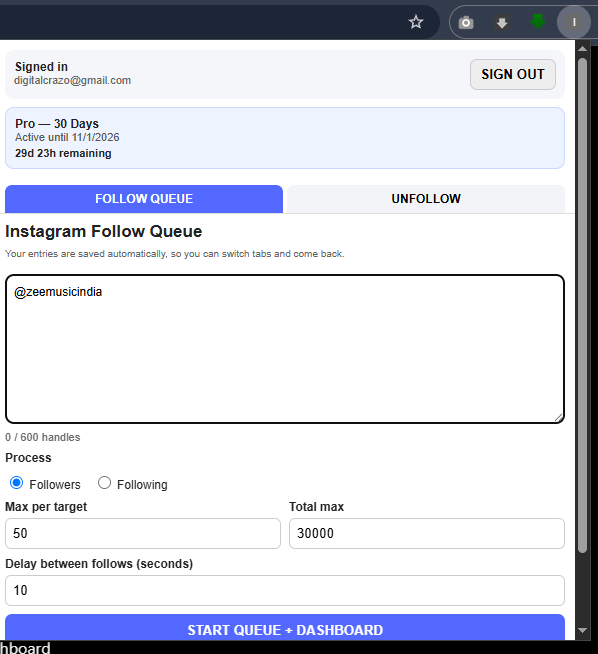
Choose the target handle, select Followers or Following, set your maximum and start your queue.
- Enter or paste Instagram handles into the queue.
- Choose between Followers and Following.
- Set the maximum number of accounts to process.
- Start the queue from the extension.
- Monitor progress from the dashboard.
- Review persistent activity logs whenever required.
How to Install
The extension is currently distributed directly for installation in Chrome.
- Download the latest extension ZIP file.
- Extract the ZIP file to a folder on your computer.
- Open Chrome and go to chrome://extensions.
- Enable Developer mode.
- Click Load unpacked.
- Select the extracted Instagram Follow Pro folder.
- The extension will appear in Chrome.
- Sign in with your Google account and start using the extension.
Get Handles & Manage Your Workflow
Add multiple Instagram handles and organize them inside your queue.
- Supports large handle lists.
- Process Followers or Following from selected target accounts.
- Set a maximum per target.
- Set a total maximum for your queue.
- Pause or stop your workflow whenever required.
- Review activity through the dashboard and persistent logs.
Simple Pricing
Start with 150 free Follow credits and upgrade when you need unlimited Follow access. No auto-renewal.
Free Access
Start with 150 free Follow credits. Each Follow action uses 1 credit, and credits do not expire.
- 150 free Follow credits
- 1 credit = 1 Follow action
- Credits do not expire
- Google sign-in
- Follow Queue
- Dashboard
- Persistent logs
Pro — 30 Days
One-time payment.
- 30 days Pro access
- No auto-renewal
- Follow Queue
- Dashboard
- Persistent logs
Pro — 90 Days
One-time payment.
- 90 days Pro access
- No auto-renewal
- Follow Queue
- Dashboard
- Persistent logs
Frequently Asked Questions
What is Instagram Follow Pro?
Instagram Follow Pro is a Chrome extension designed to help organize and manage your Instagram follow workflow through queues and a dashboard.
Is there a free option?
Yes. New users receive 150 free Follow credits without payment. Each Follow action uses 1 credit, and the credits do not expire.
Is there automatic renewal?
No. The Pro plans are one-time purchases and do not automatically renew.
How do I sign in?
Sign in using your Google account from inside the extension.
Can I use it on multiple computers?
Your Pro access is associated with your Google account. Sign in using the same account to access your account status.
What happens when my Pro period expires?
Your account returns to free access with any remaining Follow credits available. Free credits do not expire. You can purchase another Pro period when required.
Do I need to use the same email when purchasing?
Yes. Use the same Google account email used inside Instagram Follow Pro when completing your purchase so your Pro access can be activated correctly.
Ready to Try Instagram Follow Pro?
Download the extension and start with 150 free Follow credits.
START FREESupport: info@digitalcrazo.site
Instagram Follow Pro is an independent software tool and is not affiliated with, endorsed by, or sponsored by Instagram or Meta.